


In crypto wallets like MetaMask or Trust Wallet, a “spending limit” (also called a token allowance or approval) is simply the permission you give to a smart contract or a decentralized app (dApp) to use your tokens, whether that’s USDT, USDC, or ETH.
This almost always comes up when you interact with a dApp. For example, when you use a dApp to stake or swap tokens, it usually asks for permission first (recall the approval pop-up that appears). That is because it needs access to your tokens to actually carry out the transaction.
Once you approve that request, the permission gets stored on the blockchain and you never really pay attention to it again. However, it may come as a shocker but it stays there until you go back and remove it yourself. It does not disappear on its own.
The amount you approve matters. If you set a limit of 1,000 USDC, the dApp can use anything up to that amount. Depending on how the platform works, it may use the entire amount at once or in smaller transactions over time (to avoid suspicion if it’s a fishy dApp).
Why Revoking The Spending Limit In Your Wallet Is Very Crucial?
Revoking spending limits is less about theory and more about protecting your wallet in practice.
When you approve a dApp or smart contract, you are giving it ongoing access to your tokens. A lot of platforms ask for unlimited approval because it saves you from approving every single transaction again. It feels convenient at the time, but it also means that contract can access your entire balance of that token if something goes wrong.
If the smart contract is hacked, has a vulnerability, or turns out to be malicious, that permission can be misused. Funds can be drained without any further action from your side.
Revoking the spending limit removes that access completely.
Not every dApp is reliable either. Some are created to trick users into giving large approvals. Even well-known or popular platforms with high security measures are not immune to bugs or exploits.
If you stop using a dApp but leave the approval active (the popup that you approved first time around), the risk is still there. That is why it makes much more sense to remove permissions you no longer need, especially the ones that are unlimited.
How To Revoke The Spending Limit In Your MetaMask Wallet?
First of all, to manage your approvals, you should use the portfolio interface in MetaMask (there are some really cool features in MetaMask if you explore).
Once you see that your wallet is connected, immediately go to the “Spending Caps” section. This is where you will be able to see all the dApps and smart contracts that currently or at present have permission to access your tokens, along with the limits you have set.
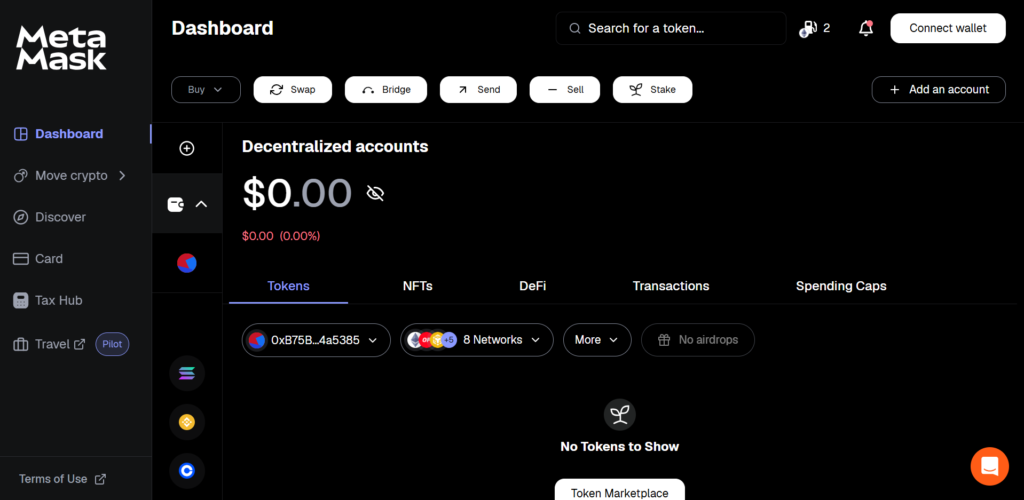
(Dashboard view where user is told to go to Spending Caps)
On the “Spending Caps” tab, you will see a list of all approvals linked to your wallet. This list would include the dApps, smart contracts alongside the specific or particular limits you have given to each.
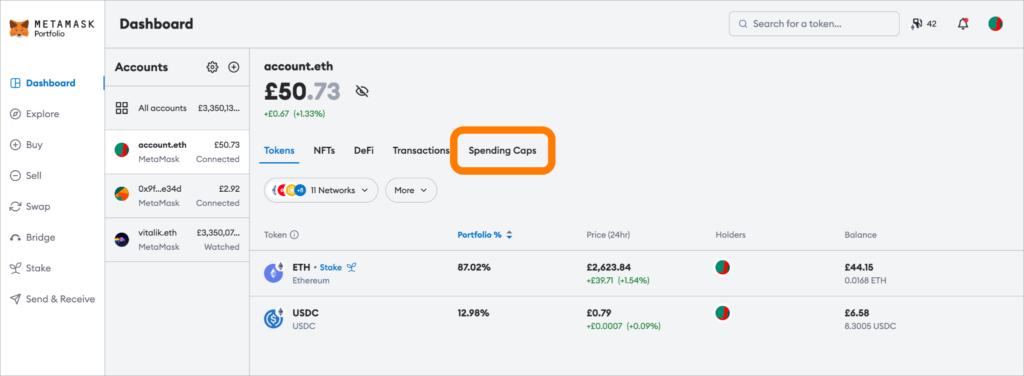
(Spending Caps tab highlighted with the entire list visible)
Find the approval that you think that it should be removed and just click on “Revoke.”
A confirmation pop-up (similar to the initial approval pop-up) will appear in MetaMask. Since this action updates the blockchain and outdoes your previous approval, you will need to pay a very small gas fee.
After confirming, the transaction will process quickly and the spending limit will be removed entirely. The dApp will no longer be able to access your tokens.
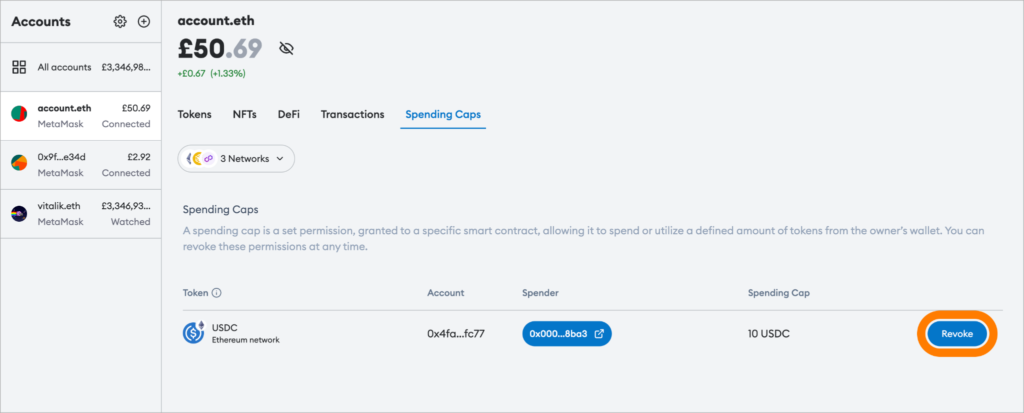
(Revoke button shown on specific token approval)
You can also review approvals using Etherscan through its token approval checker.
Wrapping Up
A lot of users lose funds not because they were directly hacked, but because they gave unlimited access to a smart contract and forgot about it.
Unlimited approvals may save time, but they also increase risk. In some cases, that risk can wipe out an entire wallet.
In crypto, you are responsible for your own security. Understanding the permissions you give, and removing the ones you do not need, goes a long way. Even small habits like using very limited approvals and checking them time to time or occasionally can help avoid unnecessary losses.


